Headless Shopify Guide: Decoupling Your Store for Speed and Scale
Stop fighting your theme. Learn when to use Hydrogen, the hidden costs of headless development, and how to decouple your storefront to build a lightning-fast customer experience.
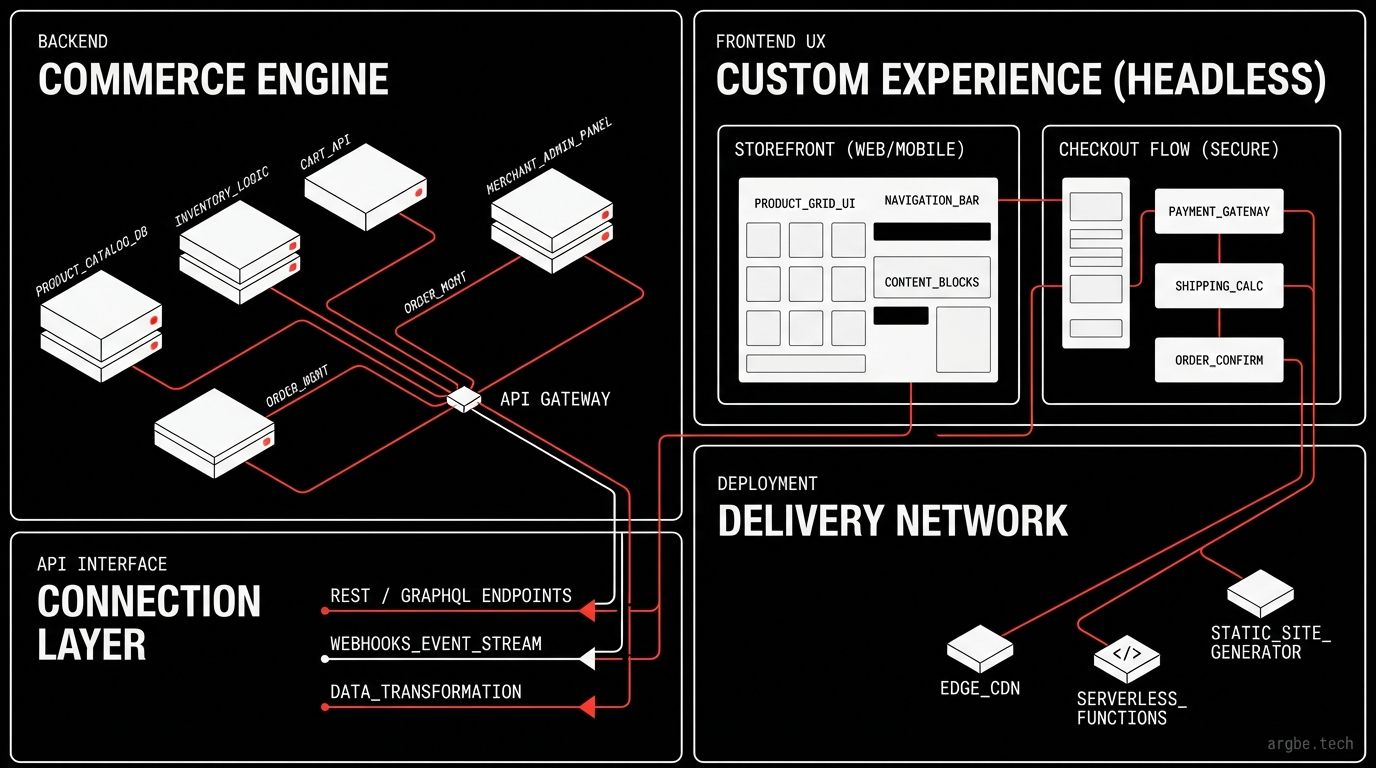
You’ve hit the ceiling with your Shopify theme. Your page load times are dragging, custom merchandising rules are a nightmare to implement, and every new feature feels like a hack.
It might be time to go headless.
A headless Shopify architecture decouples your frontend customer experience from your backend commerce engine. You keep Shopify’s rock-solid checkout, inventory, and order management, while building a lightning-fast, custom storefront using modern frameworks like React or Astro.
This guide cuts through the developer jargon to help you decide if a custom storefront is the right move for your brand—and what it actually takes to build one.
What “Headless” Actually Means on Shopify
Headless isn’t just “Shopify, but custom.” It’s “Shopify, but decoupled.”
Behind the scenes, Shopify continues to power your catalog, pricing, inventory, customer data, and order lifecycle. The only thing that changes is where your customer-facing experience lives.
If you’ve only ever built on Shopify Liquid themes, you’re used to an all-in-one system. Shopify renders the templates and serves the pages. For most stores, this remains the fastest path to revenue.
But when your theme becomes a blocker instead of a builder—when you can’t ship complex merchandising logic, multi-market experiences, or highly interactive product flows without fighting the platform—headless becomes a serious contender.
Weighing the tradeoffs? Start here: Shopify Hydrogen vs Liquid: When to Go Headless.
The 3 Storefront Models (And How to Choose)
When engineering teams say “we’re going headless,” they usually mean one of three very different approaches. Picking the wrong one is the fastest way to burn your budget.
1. Theme-First (Liquid & Online Store 2.0)
This is Shopify’s default. It uses Liquid templates, Online Store 2.0 sections, and the visual theme editor. It’s opinionated, highly mature, and impossible to beat for time-to-market.
The catch: Your UX is entirely bound by Shopify’s rendering model and theme architecture.
2. The Official Headless Route (Shopify Hydrogen)
Hydrogen is Shopify’s React-based framework for custom storefronts. It speaks Shopify’s language fluently via the Storefront API and ships with pre-built patterns for product pages, carts, and routing.
The verdict: If you’re going headless, Hydrogen is the least risky path. The integration is clear, and Shopify actively maintains the ecosystem.
3. Fully Custom Headless (Your Framework + API)
You bring your own framework (like Astro, Next.js, or SvelteKit) and wire it up to the Shopify Storefront API. You get absolute control over every pixel and millisecond.
The catch: You inherit all the heavy lifting Hydrogen normally absorbs—like caching strategies, cart mechanics, and localized SEO primitives.
When Headless Shopify Is Worth It (and When to Walk Away)
We only recommend headless when your primary bottleneck is the customer experience, not your content entry process.
Headless makes sense if you are dealing with:
- Extreme Merchandising Complexity: You need algorithmic collections, intensive variant logic, custom bundle builders, or complex B2B rules.
- Multi-Surface Commerce: You want a single Shopify backend to feed your website, a mobile app, in-store kiosks, and partner portals simultaneously.
- Aggressive Performance Goals: You need sub-second load times using route-level streaming or advanced caching strategies that standard themes simply cannot support.
- A Heavy Integration Roadmap: You’re blending commerce with a robust third-party CMS, intense personalization engines, or custom search tools.
When should you walk away?
If your real problem is messy product data, slow internal processes, or unclear brand positioning, headless won’t save you. It will only amplify the chaos by adding a custom software application to your maintenance backlog.
The Hidden Costs: What Nobody Puts in the Pitch Deck
Headless architecture buys you ultimate flexibility, but you pay for it in three currencies: maintenance, operational maturity, and tooling alignment.
1. You Own the Edges (Maintenance)
With a standard Liquid theme, Shopify handles a lot of edge cases implicitly. In a headless build, your team owns the UI states for every potential failure point. Out-of-stock variants? Partial inventory? Shipping restrictions? API latency? You have to design and build the fallback experiences for all of them. A custom storefront is a living product, not a launch-and-forget project.
2. Caching is a Feature, Not an Afterthought (Operations)
Headless performance is essentially a brilliant caching strategy wearing a beautiful UX coat. Your experience lives or dies on how intelligently you cache product data, manage active cart sessions, and fail gracefully when third-party services lag. If you aren’t using Hydrogen, your caching architecture needs to be flawless from day one.
3. The Theme Editor Stays Behind (Alignment)
Marketing teams love the Shopify theme editor because it’s fast and safe. In a headless world, you lose that out-of-the-box visual builder. You’ll need to construct a new “change surface”—whether that’s integrating a headless CMS like Sanity, or building a strict component library. You must explicitly define who can change what, and how those changes ship to production.
The Smart Play: Try Hybrid Before Going All-In
The “headless or not” debate often misses the most practical solution: The Hybrid Approach.
- Keep Liquid where it excels: Use your standard theme for basic collection pages, the blog, and proven marketing patterns.
- Use Headless where it counts: Deploy custom headless routes strictly for high-value touchpoints—like an immersive flagship product page (PDP), a complex custom configurator, or an embedded buying flow.
This minimizes your technical risk, maintains your marketing velocity, and gives you a profitable proof-of-concept before you rewrite your entire site.
Looking further ahead? If your roadmap includes autonomous operations, a headless layer creates the perfect foundational API for AI agents. Dive deeper into our Headless Shopify + AI Agents: The 2026 Playbook.
Your Headless Implementation Checklist
Thinking about pulling the trigger? Here is exactly what you need to implement. It’s designed to be scannable, practical, and honest about the effort required.
(Note: The exact technical architecture varies wildly based on your catalog and target markets. We map that out during working sessions.)
| Step | What You Must Implement | Effort | Impact | Why It Matters |
|---|---|---|---|---|
| 1 | Define the core storefront model (Liquid, Hydrogen, or Custom) | Medium | High | Prevents costly architecture drift and rework down the line. |
| 2 | Map your “source of truth” for Shopify data vs. CMS data | Medium | High | Stops your team from duplicating data entry across platforms. |
| 3 | Establish Storefront API query patterns and code fragments | Medium | High | Keeps performance lightning-fast and the codebase maintainable. |
| 4 | Finalize the cart and checkout approach (native vs. extensibility) | Medium | High | Checkout constraints will drive your largest overall UX decisions. |
| 5 | Build aggressive caching rules by route (PDP, PLP, content) | Large | High | Headless speed wins come directly from ruthless caching discipline. |
| 6 | Implement localized SEO primitives (metadata, canonicals, schema) | Medium | High | Headless strips away default theme SEO; you alone must replace it. |
| 7 | Configure webhooks for inventory and product data freshness | Medium | Medium | Keeps the storefront accurate without expensive, aggressive polling. |
| 8 | Audit and integrate required third-party apps (reviews, search) | Large | Medium | App parity is rarely 1:1; many require deep custom integration work. |
| 9 | Harden UI error states (timeouts, partial data, empty carts) | Medium | Medium | Bad error handling kills conversion and spikes support tickets. |
| 10 | Set up full observability (core web vitals, latency, error tracing) | Medium | Medium | Essential for debugging production checkout issues on the fly. |
| 11 | Deploy a new content workflow for the marketing team | Medium | Medium | Ensures your marketing team can still launch campaigns autonomously. |
| 12 | Run a high-fidelity launch rehearsal (redirects, traffic, rollback) | Medium | High | The only safe launch is one you can instantly and cleanly roll back. |
Ready to Supercharge Your Storefront?
Deciding whether to stay in Liquid or migrate to a headless architecture isn’t a technical choice—it’s a business strategy. What critical customer experience are you trying to ship that your current theme simply cannot handle?
We build lightning-fast, high-converting storefronts. We can help you frame the architecture decision, map out the smallest viable headless scope, and sidestep the hidden maintenance costs that blindside most brands.
Your Next Steps:
- Dig Deeper: Read Shopify Hydrogen vs Liquid: When to Go Headless for a direct technical comparison.
- Get Expert Eyes: Tell us the top two bottlenecks in your current storefront (e.g., PDP conversion, slow collection discovery, or checkout drop-off). We’ll give you a straight answer on whether headless is actually the right tool for the job.
Want a second opinion on your roadmap? Reach out to our team to map out an architecture that actually drives revenue.