Headless Shopify Performance: The No-Nonsense Guide to Faster Load Times & Higher Conversions
Stop guessing why your headless Shopify store is slow. Learn how to fix your Core Web Vitals, optimize edge rendering, and actually get the conversion lift you were promised.
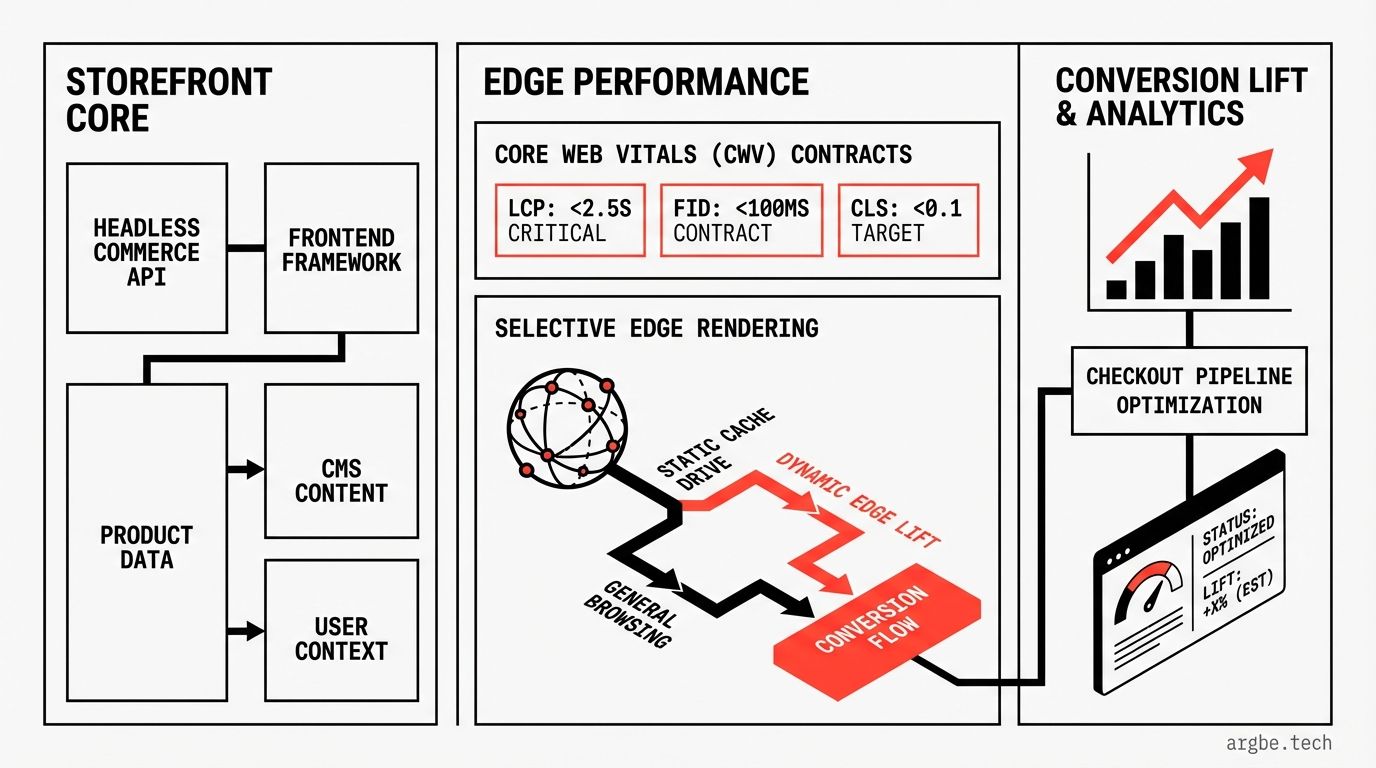
- The LCP/INP tradeoff is real: Fast load times and quick interactivity often pull in opposite directions, requiring a strict render-path strategy.
- Edge rendering isn’t magic: It cuts Time to First Byte (TTFB), but poor cache segmentation will hurt your input delay (INP).
- The quickest win: Most Shopify Plus headless slowdowns come from mis-prioritized hero images. Fix your lazy-loading and sizing policies to see immediate LCP improvements.
Stop Chasing Scores: The Performance Contract
When leadership asks for “better performance,” they don’t care about your Lighthouse score. They want fewer abandoned carts, fast Product Detail Pages (PDPs), and zero complaints about a “laggy site.” Performance isn’t a score; it’s a contract between product, design, and engineering to hit strict Core Web Vitals targets on every single release.1
Those vitals breakdown into three non-negotiables:
- LCP (Largest Contentful Paint): How fast your main content appears.
- INP (Interaction to Next Paint): How snappy the page feels when users click.
- CLS (Cumulative Layout Shift): How stable the page is while loading.
The biggest mistake teams make? Not putting this contract in writing. By documenting your targets, you force hard tradeoffs into the open and avoid accidentally breaking the shopping experience just to improve one metric.
Here is a baseline performance contract you can copy today. Use your real user monitoring (RUM) percentiles—no guessing allowed.
| Metric | Baseline (p75) | Target (p75) | Notes |
|---|---|---|---|
| LCP | Your current p75 | ≤ 2.5s | Track by page type (Home, PLP, PDP) |
| INP | Your current p75 | ≤ 200ms | Watch “added-to-cart” and variant changes |
| CLS | Your current p75 | ≤ 0.1 | Watch out for images, fonts, and injected UI |
| TTFB | Your current p75 | ≤ 0.8s | Break down by cache hit vs miss |
| Cache hit rate | Your current p75 | ≥ 85% | Measure this at the edge, not origin |
The crucial connection: Shopify Storefront API latency directly impacts your LCP. Because product data fetches often sit on the critical rendering path, your hero frame literally cannot load until that data arrives.2
To make this contract operational, encode it as a non-negotiable checklist for every pull request:
{
	"performanceContract": {
		"pageTypes": [
			"home",
			"collection",
			"product",
			"cart"
		],
		"metrics": {
			"LCP_p75_target": "<= 2.5s",
			"INP_p75_target": "<= 200ms",
			"CLS_p75_target": "<= 0.1",
			"TTFB_p75_target": "<= 0.8s (cache hit) / track miss separately"
		},
		"guardrails": {
			"jsBudget": "defined per page type (Home/PLP/PDP/Cart) and enforced as a release gate",
			"imagePolicy": "hero assets pre-sized + modern formats",
			"personalization": "must not block first content"
		}
	}
}
Why Headless Fails (And How It Wins)
Most headless storefronts end up slower than basic Liquid themes. Why? Because teams ship complex, “smart” personalization before they enforce performance limits. A/B testing tools, heavy analytics, and complex UI widgets get slapped on early. The result? Your initial render becomes a sluggish chain of waits that you can’t even see in a lab test.
Standard Liquid themes perform well because the page shape is stable and highly cacheable. Headless wins when your UX demands heavy interaction, app-like navigation, or complex merchandising rules that Liquid would struggle to support.
While frameworks like Hydrogen provide a solid architectural starting point, they can’t save you from the laws of physics. Push too much heavy lifting to the client, and you’ll get a store that feels fast on your MacBook but crawls on a customer’s standard iPhone.
Avoid the classic failure pattern:
- Moving rendering to JavaScript without locking down the critical render path.
- Adding personalization that shatters your cache keys.
- Saying “we’ll optimize later.” (Spoiler: You won’t. Revenue driving features always win the sprint.)
If your storefront’s main goal is just displaying a catalog, Liquid will often beat headless on load time. But if your goal is deep interaction and complex logic, headless handles it best.
The golden rule of headless performance: Stability first, personalization second.
Tuning Core Web Vitals for Headless
You aren’t just tweaking a few image tags. You are optimizing a complex system: data fetches, HTML delivery, client hydration, and your entire third-party ecosystem.
Without Real User Monitoring (RUM), you are flying blind. You must see p75 behavior by device, geography, and page type. Relying solely on your dev environment means you will ship performance regressions that you only notice when your conversion rate starts tanking.
Here is the exact framework to prioritize your engineering efforts:
Headless Shopify Performance Levers
| Lever | Target Metric | Expected Impact | The Hidden Risk | How to Verify |
|---|---|---|---|---|
| Render critical above-the-fold HTML on server | LCP | Improve | Increases server workload, hurting uncached TTFB | LCP p75 drops; LCP element remains stable |
| Defer hydration for non-critical UI | INP | Improve | Breaks interactivity if users click too early | INP p75 drops on “add to cart” actions |
| Slash third-party scripts | INP | Improve | Marketing sneaks tags back in | Long tasks plunge; mobile INP p75 drops |
| Fix your hero image policy | LCP | Improve | Wrong priority settings eat up bandwidth | Hero image is the LCP element; sizes match |
| Pre-allocate space for injected UI | CLS | Improve | Leaving too much space makes the page look empty | CLS p75 drops; RUM shows zero layout shifts |
The “Hero Policy” (Fix This First)
Most teams completely mishandle their LCP element (usually a PDP hero image). It shouldn’t be lazily loaded, and it needs proper formatting.
Your new default policy:
- Never lazy-load the hero image.
- Give the hero image stable dimensions matching the UI to prevent CLS layout shifts.
- Serve it in modern formats (like WebP/AVIF) with a strictly matched
srcset. - Only preload the image that will actually be used.
The 5-minute sanity check:
- Open Chrome DevTools > Network. Ensure the hero image loads immediately, not gated behind JS.
- Confirm Performance panel reports the hero image as your exact LCP element.
Always remember: When you improve LCP by pushing UI work into client-side hydration, your INP gets worse. The page looks ready, but it’s frozen while the browser catches up. Every performance fix must either improve LCP without adding early main-thread lag, or improve INP by deleting long tasks.5
The Edge Rendering Trap
Pushing rendering to the edge isn’t a silver bullet. Yes, moving compute to Cloudflare Workers can slash TTFB, but only if your cache stays intact. If you try to personalize everything by user, geo, and currency, your cache hit rate will plummet. You’ll force more origin requests, instantly killing your site speed.6
The Edge vs Origin Playbook:
| Page Type | Cacheability | Personalization | Best Render Strategy | The Catch |
|---|---|---|---|---|
| Home | Medium | Medium | Edge (coarse cohorts) | Too many tests destroy hit rates |
| Collection (PLP) | High | Low | Edge | Heavy filtering explodes cache keys |
| Product (PDP) | Medium | Medium | Origin (with cached fragments) | Variations and locales get tricky |
| Cart | Low | High | Origin | Radically unique per-user |
| Account | Low | High | Origin | Privacy rules dominate |
The counter-intuitive secret: Define strict cache boundaries. Only key your cache on vital segments like locale + currency + logged-in status. Inject hyper-personalized components as dynamic fragments client-side after the stable shell loads.
How to Actually Get That Conversion Lift
Conversion lifts come from fixing friction, not just upgrading your tech stack. If you ruin interactivity with a bloated Google Tag Manager, or you fail to optimize your imagery, your conversion rate will suffer.
Treat your analytics tags like production code. Budget them, audit them periodically, and aggressively block new scripts until they prove they don’t destroy your INP.
Checklist for Conversion Readiness:
| Vital Action | Owner | Target | Status |
|---|---|---|---|
| Segment RUM by page type | Engineering | ≥ 95% of sessions | |
| Enforce strict script budgets | Growth | INP p75 ≤ 200ms | |
| Lock down Hero Asset Policy | Design | LCP p75 ≤ 2.5s | |
| Track edge cache hit rate | Platform | Hit rate ≥ 85% | |
| Isolate performance from UX changes | Analytics | Zero confounded variables |
You get conversion lift from removing friction during first content loads, button clicks, and add-to-carts—and then proving it with flawless analytical measurement.
The Phased Roadmap
If you want to speed up your headspace without falling into an eternal refactor loop, follow this order carefully.
Phase 1: Instrumentation
- Run Lighthouse for initial diagnostics.7
- Establish RUM tracking sliced by device and page.
- Lock in your Performance Contract.
Phase 2: Render Path Reboot
- Split stable UI shells from dynamic fragments.
- Audit and trim third-party scripts.
- Execute the Hero Asset policy exactly as scoped above.
Phase 3: Clean Experimentation
- Use WebPageTest to test TTFB variations globally.8
- Run A/B tests with strict boundaries on what cannot be changed.
- Track metrics using confident data ranges, not wild guesses.
What’s Next: Finding the Right Balance
If you simply sell standard products and rely on great content, stick with Liquid. It’s fast, predictable, and simple.
If you need a highly interactive, app-like storefront, headless is your best friend—but only if you heavily invest in caching and performance budgets.
Usually, a hybrid approach wins out: Cache the stable parts of your page aggressively, and save the headless complexity for the specific moments where interaction directly drives revenue.
Keep diving deeper:
- See our foundational blueprint: The Ultimate Guide to Headless Shopify Development.
- Need help deciding? Read Shopify Hydrogen vs Liquid: When to Go Headless.
- Gearing up for the future? Check out Headless Shopify + AI Agents: The 2026 Playbook.
- Growing pains? See Scalable Shopify Plus Architecture for 2026.
If you need a team to lock in these performance gates and budgets for your headless codebase, Argbe.tech usually operates on a Fixed weekly rate model.
Fixed weekly rate Typically within 24 hours