Model Context Protocol (MCP) Server Guide: Build Tool-Connected AI
An MCP server is a small integration layer that lets AI models call real tools—safely, consistently, and with clear boundaries. This guide explains what MCP servers do, where they fit in an agent stack, and the implementation checklist we use to ship them without surprises.
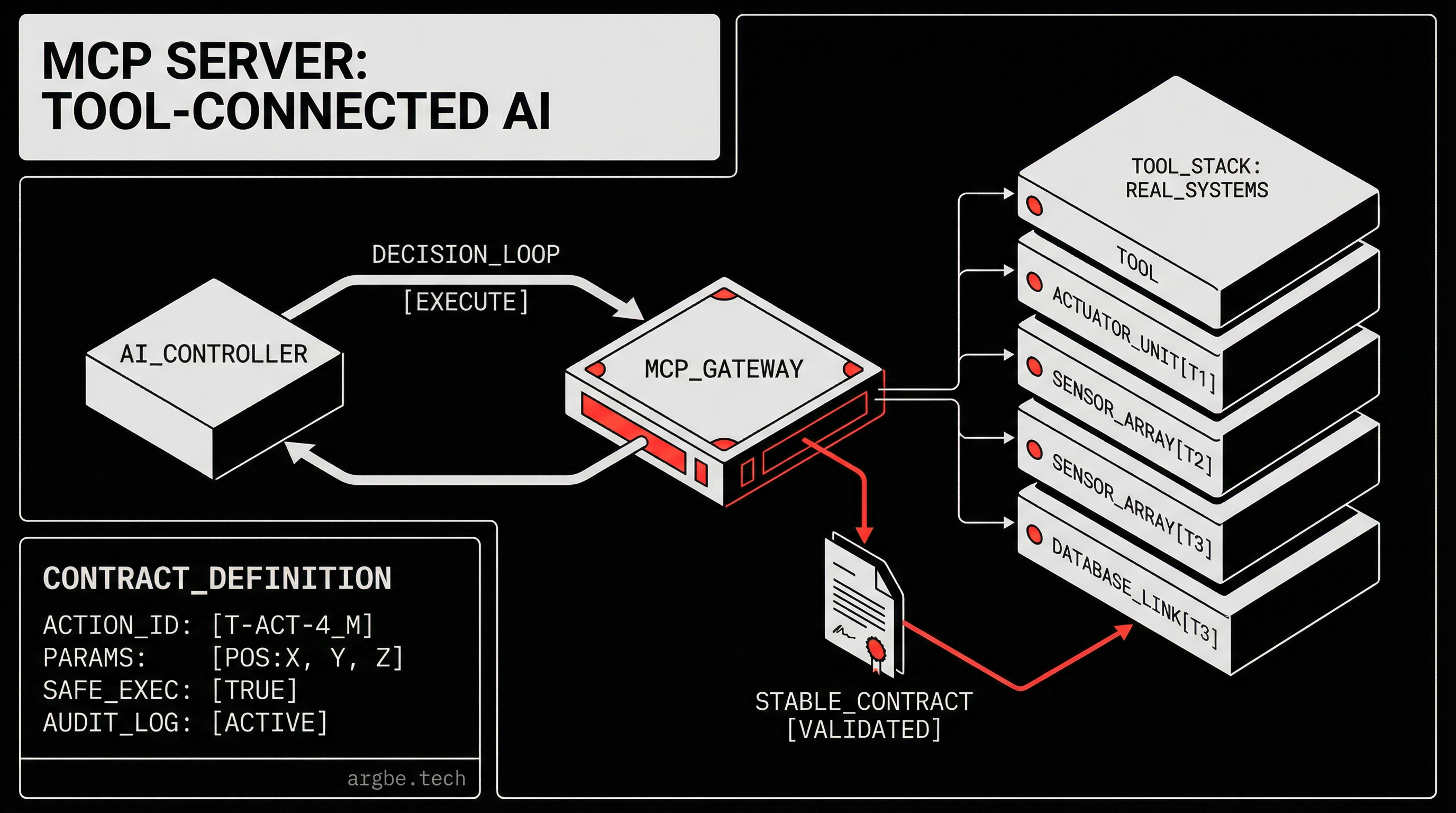
An mcp server guide is a practical blueprint for building a Model Context Protocol (MCP) server that connects an AI agent to real tools (APIs, databases, files, and internal services) through a controlled interface. It turns “the model can reason about actions” into “the model can safely execute actions.”
What an MCP server actually is (and what it isn’t)
An MCP server sits between an LLM and your systems. It exposes a catalog of tool capabilities, accepts structured tool calls, runs those calls in your environment, and returns results in a way the model can reliably interpret.
We’ve found it helps to describe an MCP server with two boundaries:
- Northbound (model-facing): stable tool definitions, predictable inputs/outputs, and guardrails that reduce model guesswork.
- Southbound (system-facing): real credentials, rate limits, logging, and business rules that protect the systems you care about.
What it is not: an agent framework, a vector database, or a permission model by itself. MCP is the “wire protocol and contract” layer. The rest of the agent stack still matters—identity, policy, evaluations, and operations—which is why we treat MCP as one component inside a production design, not the design itself. If you want the broader map, start with The Enterprise Agent Stack: Identity, Tooling, Evaluations, and Guardrails for Production AI Agents.
Why MCP servers exist: reliability beats clever prompts
When an agent fails in production, it’s rarely because the model “couldn’t think.” It’s usually because the tool interface was vague, the schema drifted, or the system side effects weren’t constrained.
In our experience, MCP servers solve three recurring problems:
- Tool contracts become explicit. The model doesn’t need to infer how to call an endpoint from prose.
- Access is centralized. You can keep credentials, retries, and throttling in one place instead of scattering them across prompts and glue code.
- Observability becomes normal. You get a single place to log “what was called, with what inputs, by whom, and what happened.”
This matters even more when you’re mixing models. Claude is strong at following a tool contract when it’s clean. Gemini tends to reward pages and systems that present structured, machine-readable interfaces. Grok, by contrast, will happily barrel through ambiguity and produce confident-looking tool plans that explode at runtime unless your interface forces precision. We build agents using Claude and Gemini, then connect them to tools via MCP, because the protocol boundary gives us a shared language even when the models behave differently.
If you’re still grounding the basics of agent behavior (planning, tool use, memory, control loops), read What Are AI Agents? A Technical Guide to Agentic Systems first—MCP makes more sense once you understand the moving parts it’s trying to stabilize.
The mental model we use: “tool catalog + execution sandbox + audit trail”
There are many ways to implement an MCP server, but the durable pattern is the same:
- Tool catalog: a small set of capabilities with crisp names and schemas (inputs/outputs), versioned like an API.
- Execution sandbox: where calls run with least-privilege credentials and strict timeouts.
- Audit trail: logs and metrics that let you explain outcomes to humans and to downstream systems.
We’ve found teams get into trouble when they treat tools as “everything the model might want” instead of “a curated set of operations we can defend.” The fastest route to an unsafe agent is a giant tool surface with no policy layer and no instrumentation.
This is where security stops being a checkbox and becomes product design. If you’re thinking about permissions, blast radius, and monitoring, pair this article with AI Agent Security: Permissions, Audit Trails & Guardrails.
Where MCP fits in a real agent stack
An MCP server is usually one hop away from your agent runtime:
- Your agent runtime handles prompts, routing, memory, and tool selection.
- The MCP server exposes and executes tools (and can enforce constraints).
- Your systems (CRMs, ticketing, billing, internal APIs) remain protected behind that boundary.
We don’t recommend putting business logic in prompts when it can live in code with tests, types, and logs. That’s a controversial stance in some “prompt-first” circles, but it holds up when you’re accountable for failures. When Grok is improvising, or when Gemini is asked to reconcile two conflicting system states, you want deterministic guardrails—so the system, not the model, is the source of truth.
Model choice still matters, though, because each one has different strengths for planning vs compliance. If you’re deciding which model should drive which parts of your agent loop, read Claude vs Gemini vs Grok: Choosing the Right LLM for Agents.
Designing tools that models can’t “misread”
The difference between a helpful agent and an expensive one often comes down to tool ergonomics. We’ve found these patterns reduce failure rates without making the system brittle:
- Use verbs that imply side effects.
create_ticketis harder to misunderstand thanticket. - Separate “plan” from “execute.” Provide a read-only tool set (search, get, list) alongside explicit write tools (create, update, delete).
- Return structured errors. A model can recover from
{"error_code":"RATE_LIMIT","retry_after_ms":5000}; it cannot recover from a generic 500 string. - Prefer narrow tools over mega-tools. Models do better with small, single-purpose tools than with one endpoint that tries to do everything.
We also avoid “magic tools” that silently do multiple writes. If you need orchestration, orchestrate in code and expose the safe operation as a tool with explicit inputs.
The “citable What” vs the “click-worthy How”
If you want this page to be cited by systems powered by Gemini, Claude, or other retrieval-driven assistants, the “What” needs to be extractable:
- A clean definition (you already got it at the top).
- Clear claims about boundaries (what an MCP server does and doesn’t do).
- A checklist table that turns ambiguity into discrete choices.
The “How” is where teams burn time: versioning tool schemas, handling auth rotation, building good redaction, and creating evals that catch dangerous tool calls before they ship. That’s also the part we typically implement with clients, because it’s less about theory and more about operational detail. This article gives the stable map; the execution details depend on your systems and risk tolerance.
Implementation checklist: MCP server steps, effort, and impact
| Step | What you implement | Effort | Impact | Notes we use in reviews |
|---|---|---|---|---|
| 1. Define the tool boundary | Decide which capabilities belong in MCP and which stay in internal services | Medium | High | If the boundary is fuzzy, the model will “discover” unsafe behaviors through trial-and-error. |
| 2. Model tool schemas explicitly | Typed inputs/outputs with clear names and constrained enums | Medium | High | We aim for schemas that a human can skim and predict outcomes from. |
| 3. Separate read vs write tools | Distinct tools for retrieval vs side effects | Low | High | This makes it easier to apply policy and to debug why something changed. |
| 4. Add auth + least privilege | Per-tool credentials, scoped tokens, short TTLs | High | High | Treat tool access like production API access, not like a prompt accessory. |
| 5. Enforce timeouts and retries | Hard execution deadlines, bounded retries, backoff | Medium | Medium | Prevents tool calls from becoming hidden “agent hangs.” |
| 6. Normalize errors | Structured error codes + remediation hints | Low | Medium | Claude and Gemini recover well when errors are consistent and actionable. |
| 7. Log an audit trail | Inputs (redacted), outputs (redacted), actor, timestamps | Medium | High | The audit trail is your post-incident timeline and your iteration fuel. |
| 8. Add redaction and data minimization | Strip secrets, mask PII, return only what’s needed | Medium | High | We treat “don’t leak” as a design constraint, not a policy document. |
| 9. Build evals for tool safety | Tests that catch unsafe/incorrect tool calls before release | High | High | This is where you turn opinions into gates you can enforce. |
| 10. Version and deprecate tools | Semantic versions, migrations, deprecation windows | Medium | Medium | Schema drift is silent until it becomes expensive. |
Next Steps
- If you need the foundation first, read What Are AI Agents? A Technical Guide to Agentic Systems and map your agent loop before you design tools.
- If you’re worried about blast radius, start with AI Agent Security: Permissions, Audit Trails & Guardrails and treat MCP as an enforcement point.
- If you’re choosing models for different parts of the workflow, use Claude vs Gemini vs Grok: Choosing the Right LLM for Agents to avoid mismatched expectations.
- If you’re shipping to production, keep The Enterprise Agent Stack: Identity, Tooling, Evaluations, and Guardrails for Production AI Agents open while you implement—MCP is strongest when it’s paired with identity and evals, not when it’s treated as the whole solution.