AI Agent Security: Permissions, Audit Trails & Guardrails
AI agent security is the discipline of constraining what an autonomous system can do, proving what it did, and preventing it from doing the wrong thing at the wrong time. This guide breaks down permissions, audit trails, and guardrails you can ship with confidence.
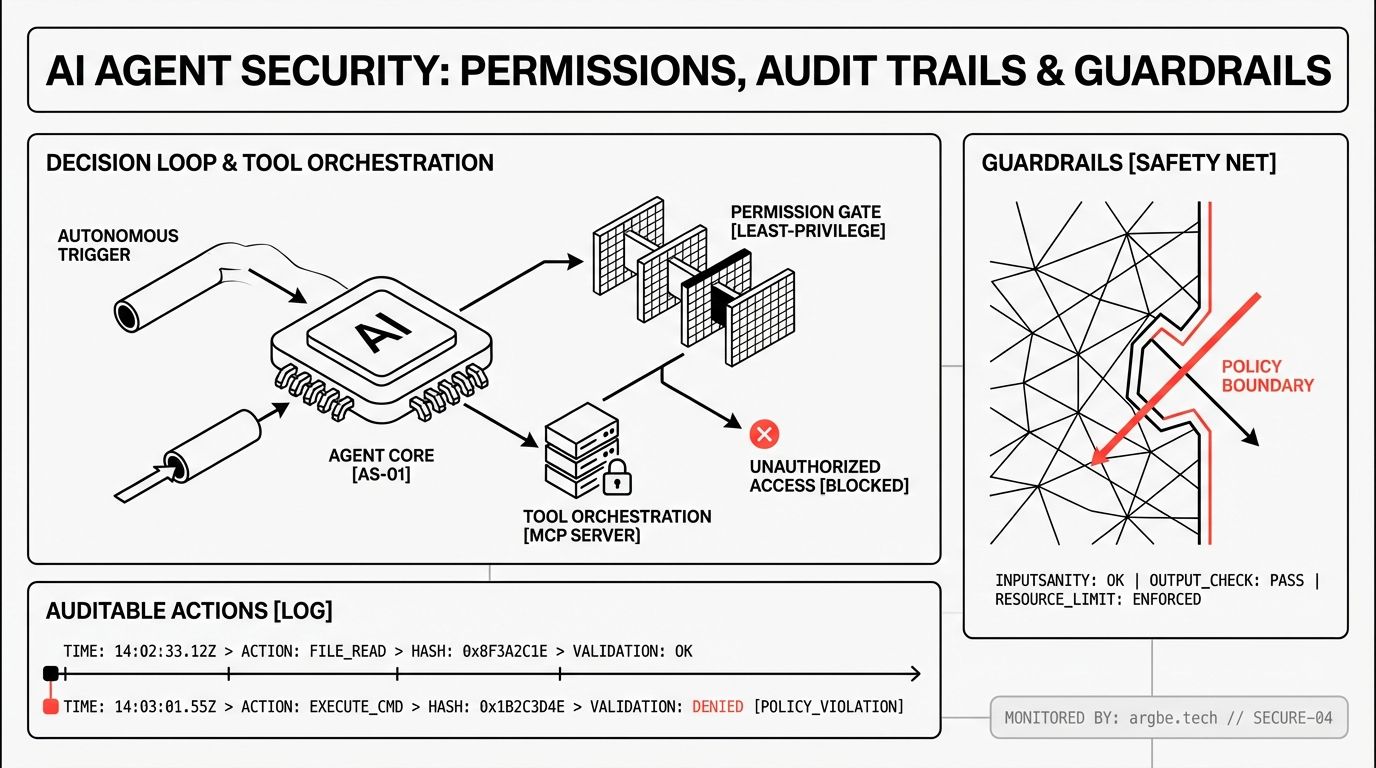
AI agent security is the set of controls that limits an agent’s real-world authority (permissions), records its actions in a way you can investigate (audit trails), and prevents predictable failure modes like prompt injection and data exfiltration (guardrails). It exists because an agent is not “just a chat”—it’s software that can call tools, move data, and change systems on your behalf.
Security Starts at the Tool Boundary
If you’re treating an agent like a smarter chatbot, security feels like a content problem: “filter the output,” “block jailbreaks,” “add a safety prompt.” In our experience, that mental model breaks the moment the agent can do things—create tickets, run scripts, query CRMs, send emails, or touch production.
Agents are different because they sit at a boundary between language and execution. They translate ambiguous natural-language intent into concrete actions. That translation step is exactly where risk concentrates: the model is probabilistic, the environment is deterministic, and your systems will obey a valid API call even if the call was persuaded by an untrusted string.
If you want the clean technical framing for what an agent is (and why “tool use” changes the threat model), start with What Are AI Agents? A Technical Guide to Agentic Systems. The short version: the moment an agent has tool access, your security posture depends more on authorization, observability, and policy enforcement than on the model’s “alignment.”
Permissions: Treat Tools as Capabilities, Not Convenience
We design agent permissions like we design production service permissions: least privilege, explicit scopes, and short-lived credentials. The goal is simple: even if the model makes a bad decision, the blast radius stays small.
The permission mistake we see most often
Teams give the agent a “god token” because it’s faster in a demo. Then they try to patch over that decision with prompt rules like “only do X.” Prompts are not permissions. They’re guidance to a reasoner that can be manipulated, misunderstood, or context-swamped.
What works better is capability-based access:
- Narrow tools over generic tools. “CreateSupportTicket” is easier to secure than “POST any URL.”
- Scoped credentials per tool and per environment. Production access should be earned, not implied.
- One-way data paths where possible. If the agent only needs to read a record, don’t also grant write.
- Approval gates for irreversible actions (sending money, deleting data, mass email).
MCP is a security primitive if you use it that way
Model Context Protocol (MCP) is often introduced as a clean way to connect models to tools. The security angle is that MCP gives you a place to centralize tool contracts: what tools exist, what arguments they accept, and what identity they run under.
Here’s the semantic bridge we use in production: we build AI agents using Claude and Gemini for reasoning, then connect them to controlled tool interfaces via Model Context Protocol (MCP) so the model can’t “invent” new privileges—it can only call what we expose.
If you’re implementing this pattern, the practical guide is Model Context Protocol (MCP) Server Guide: Build Tool-Connected AI. The key security move is to treat the MCP server as an enforcement point: validate inputs, enforce allowlists, and refuse risky calls even when the model “asks nicely.”
Audit Trails: Make Every Action Forensic-Ready
When an agent fails, the first question is never “why did the model say that?” The question is: what did it do, using which credentials, to which system, with what data?
We’ve found that teams underestimate how quickly “agent incidents” turn into incident response. An agent can touch multiple systems in a single session. Without a trace, you’re stuck reconstructing events from partial logs across vendors.
An agent audit trail should answer these, consistently:
- Who initiated the session (human user, service account, scheduled run)?
- What model was used (Claude, Gemini, Grok), and which version/config?
- Which tools were called, with which parameters (redacted as needed)?
- What data was read/written, and where it went next (data lineage)?
- What policy decisions were applied (allowed, denied, escalated to approval)?
Good audit trails are also useful, not just compliant:
- Correlation IDs that follow the session across tools.
- Deterministic tool schemas so “what happened” is searchable.
- Redaction and retention rules so logs don’t become a second data leak.
- Replayability for debugging: the ability to simulate the same tool calls in a sandbox.
If you want the broader production framing—identity, tool governance, evaluations, and ongoing guardrails—read The Enterprise Agent Stack: Identity, Tooling, Evaluations, and Guardrails for Production AI Agents. The big idea is that agents deserve the same operational rigor as any other distributed system.
Guardrails: Where the Model Choice Helps—and Where It Doesn’t
Claude, Gemini, and Grok each have different strengths for agent workloads: reasoning style, context handling, tool-call reliability, and “personality” under pressure. We select among them based on the job: deep analysis, structured tool execution, or faster iteration when real-time signals matter.
But agent security fails when you rely on the model to be the guardrail.
In our experience, the highest-leverage guardrails sit around the model:
- Strict tool input validation (types, ranges, allowed enums, deny risky strings).
- Policy checks before execution (identity + intent + impact).
- Egress controls so sensitive data can’t be posted to arbitrary endpoints.
- Sandboxing for code execution, file access, and network calls.
- Human-in-the-loop for high-risk operations, with a clear diff of proposed actions.
Model choice still matters—just not in the magical way people hope. A better-behaved model can reduce how often you hit guardrails. It cannot replace them. A prompt injection that convinces the agent to call “export all contacts” is a permissions and policy problem, regardless of whether the reasoning engine is Claude, Gemini, or Grok.
We go deeper on model selection tradeoffs (and what “good at agents” actually means) in Claude vs Gemini vs Grok: Choosing the Right LLM for Agents. If you’re making a security decision, treat that guide as input—not the control plane.
Risk Matrix for AI Agent Security
The table below is designed for citation: clear threat categories, expected likelihood/impact, and the mitigations that consistently hold up in real deployments.
| Threat type | Likelihood | Impact | Primary mitigations |
|---|---|---|---|
| Prompt injection via untrusted content (docs, tickets, web pages) | High | High | Treat tool calls as untrusted; validate arguments; restrict scopes; add approval gates for sensitive actions; isolate retrieval sources |
| Data exfiltration (agent sends secrets/PII to external endpoints) | Medium | High | Egress allowlists; redact secrets in context; token scoping; classify data before tool use; log + alert on unusual exports |
| Privilege escalation by tool chaining (harmless call → powerful outcome) | Medium | High | Least-privilege tool design; split read/write tools; enforce step-level policies; cap batch sizes; require explicit user confirmation for destructive actions |
| Over-broad credentials (“agent has admin”) | Medium | High | Short-lived credentials; per-tool identities; environment separation; periodic access review; break-glass workflows |
| Shadow tools and supply-chain risk (unsafe integrations, plugins, wrappers) | Medium | Medium | Vendor/tool review; signed artifacts; allowlist MCP servers; pin versions; runtime permission prompts and deny-by-default |
| Unauthorized actions due to identity confusion (wrong tenant/user/context) | Low | High | Strong session identity binding; tenant-scoped tokens; contextual access checks; explicit “act as” fields in tool schemas; audit trails with correlation IDs |
| Hallucinated or malformed tool calls (schema drift, wrong parameters) | Medium | Medium | Strict JSON/schema validation; typed tool definitions; contract tests for tools; fail-closed execution; safe defaults |
| Cost/availability attacks (runaway loops, expensive tool usage) | Medium | Medium | Rate limits; budget caps; step limits; circuit breakers; queueing and backpressure; anomaly detection on tool-call patterns |
We intentionally don’t publish our full step-by-step hardening playbook in a blog post, because implementation details become a blueprint for attackers as fast as they become a checklist for defenders. When we implement agent security for clients, we provide the exact policy templates, logging fields, and approval flows during delivery, tied to the systems and data they actually have.
Next Steps
- Inventory every tool your agent can call, then delete or split “generic” tools into narrow capabilities.
- Put MCP (or your tool gateway) in front of execution and enforce validation + deny-by-default policies there.
- Add audit trails that tie model outputs to tool calls, identities, and downstream effects with correlation IDs.
- Decide which actions require human approval, and design a review UI that shows the exact proposed changes.
- Run a focused red-team exercise on prompt injection and data exfiltration before you add new integrations.