What Are AI Agents? A Technical Guide to Agentic Systems
AI agents are goal-directed software systems that use an LLM to decide what to do next and then take real actions through tools. This guide breaks down what makes an agent an agent, where they fail, and how teams ship them safely.
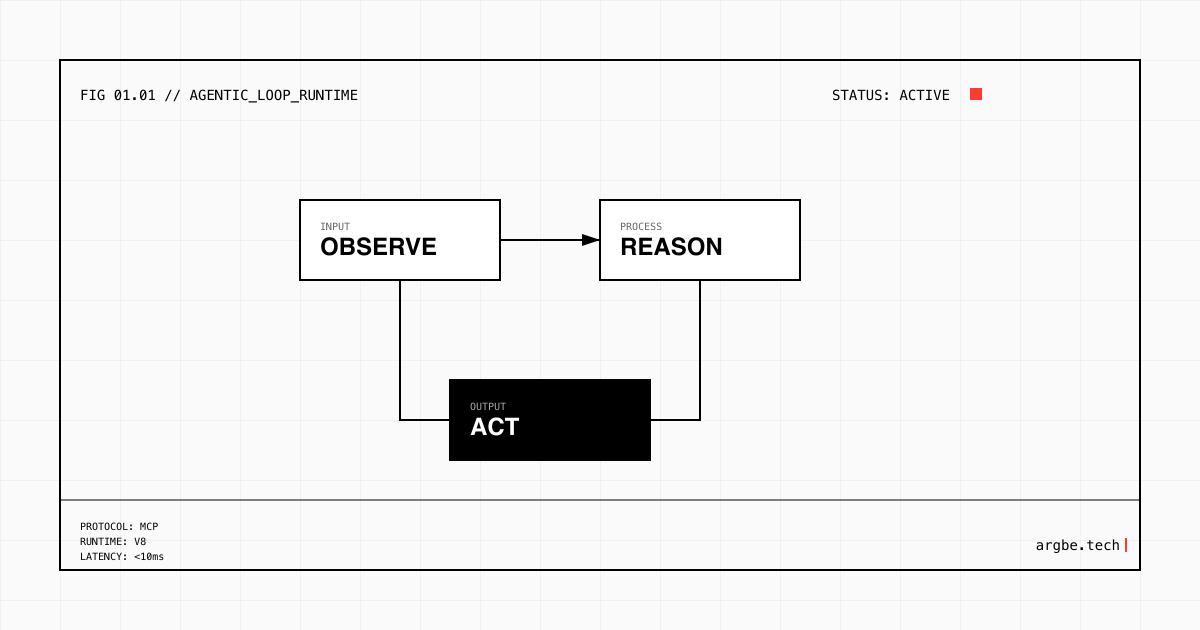
AI agents are software systems that use an LLM to plan, decide, and act toward a goal, usually by calling tools (APIs, databases, browsers, code runners) and learning from feedback. They turn a language model from “answering” into “doing” by running a loop: observe the situation, choose the next step, execute it, and repeat until a stop condition is met.
The defining trait: an action loop, not a chat UI
Most confusion comes from treating “agent” as a product category. In practice, “agent” is a systems property: you have a decision-maker (often an LLM) that can take actions, track state, and adjust its behavior based on what happens next.
Here’s the clean boundary we use:
- A chatbot primarily produces text responses.
- An automation primarily runs a fixed sequence of steps.
- An AI agent chooses the next step at runtime, based on observations, constraints, and its current state.
In our experience, the minute you let the system decide which tool to call, when to call it, and when to stop, you’ve crossed into agentic behavior—even if the interface still looks like chat.
How AI agents work (a technical mental model)
Under the hood, most agentic systems converge on the same anatomy:
- Goal: what “done” means (a ticket resolved, a report generated, a workflow completed).
- Context: the information needed to act (inputs, policies, history, retrieved docs).
- Policy: the decision process (an LLM prompt, a controller, or a hybrid).
- Tools: callable capabilities (search, CRUD APIs, code execution, ticketing, CRM).
- State: durable memory that survives steps (task status, intermediate results, artifacts).
- Feedback: signals that shape the next choice (tool output, errors, user review, tests).
We’ve found that teams ship “agents” faster when they stop asking “Which model?” first and ask “What loop are we building?” first. Model choice (Claude vs Gemini vs Grok) matters, but loop design determines whether the system is predictable, debuggable, and safe.
Why tool connection matters (and where MCP fits)
An agent without tools is mostly a planner trapped in a text box. The moment it can call real services—your database, your billing API, your support desk—it becomes operational.
This is where Model Context Protocol (MCP) shows up as a practical integration layer. Instead of writing one-off adapters for every model and every tool, MCP standardizes how an agent discovers tools, reads tool schemas, and calls them safely. We build agents with Claude or Gemini as the reasoning engine, then connect them to tool surfaces through MCP so the “brain” and the “hands” stay loosely coupled.
If you want the concrete mechanics (server shape, tool definitions, auth patterns), use the cluster guide: Model Context Protocol (MCP) Server Guide: Build Tool-Connected AI.
Autonomy is a dial, not a binary
“Autonomous agent” gets marketed as a yes/no feature. In production, it’s a set of knobs:
- Scope: which actions are even allowed (read-only vs write vs destructive).
- Approval: which actions require a human checkpoint.
- Budget: time, tool calls, and cost caps.
- Stop rules: what counts as success, failure, or “ask for help.”
We’ve found that most successful deployments start with constrained autonomy: narrow tool access, explicit stop conditions, and a clear escalation path. As reliability improves, autonomy expands.
Where agents fail (and how to think about reliability)
Agent failures are rarely mysterious. They tend to fall into a few buckets:
- Bad context: missing data, wrong retrieval, stale state.
- Tool mismatch: the tool exists, but the schema or outputs don’t match the agent’s assumptions.
- Unsafe actions: the agent can do the wrong thing faster than a human can notice.
- Non-terminating loops: it keeps “trying one more thing” because success criteria are fuzzy.
- Silent errors: it produces a plausible narrative while tools are failing underneath.
In our experience, the fix is almost never “prompt harder.” The fix is to make the loop observable: structured tool outputs, explicit state transitions, traceable decisions, and tests that score behavior over time.
For the guardrail and audit side of this, see: AI Agent Security: Permissions, Audit Trails & Guardrails.
Choosing the “brain”: Claude vs Gemini vs Grok (what we optimize for)
Different models tend to shine in different parts of an agent loop:
- Some are better at multi-step reasoning and constraint following (useful for planning and policy).
- Some are better at retrieval and broad coverage (useful for research and synthesis steps).
- Some are better at tone and speed (useful for interactive workflows and iteration).
We don’t treat this as brand fandom. We treat it as fit: the model is a component in a system with tools, state, and guardrails. If you want the decision framework we use when selecting between Claude, Gemini, and Grok for agentic workloads, read: Claude vs Gemini vs Grok: Choosing the Right LLM for Agents.
Production agents need more than prompts
If your agent can change customer data, create tickets, or trigger payments, you need more than a clever system prompt. We usually design production agent stacks around:
- Identity and access control: who the agent acts as, and what it can touch.
- Tool governance: versioned tool schemas, allowlists, and environment separation.
- Evaluations: repeatable test sets that catch regressions (accuracy, safety, latency).
- Human-in-the-loop: targeted approvals where mistakes are expensive.
- Audit trails: traces you can review after a bad outcome.
We’ve found that “agent reliability” is mostly stack discipline. The model is important, but the system around it is where incidents are prevented.
For a full production view, use: The Enterprise Agent Stack: Identity, Tooling, Evaluations, and Guardrails for Production AI Agents.
Quick reference: key agent concepts, definitions, and examples
| Concept | Definition | Example in an agentic system | What to watch |
|---|---|---|---|
| AI agent | A goal-directed system that decides and executes next actions via tools, using feedback and state. | “Resolve this support ticket” agent that reads the thread, checks account status, drafts a reply, and updates the CRM. | Clear stop conditions and scoped permissions. |
| LLM (reasoning engine) | The component that proposes plans, selects tools, and interprets tool outputs. | Claude generates a plan; Gemini summarizes retrieved docs; Grok handles fast iterative drafting. | Model limits, policy adherence, hallucination under tool failure. |
| Policy/controller | The rules that shape agent decisions (prompt, router, or hybrid logic). | “Must ask approval before write operations” enforced by a controller. | Drift between intended rules and actual behavior. |
| Tools | Callable capabilities the agent can use to change the world. | Search, SQL, ticketing API, payment API, code runner. | Tool schemas, error handling, and idempotency. |
| State (working memory) | The structured record of what has happened so far and what remains. | Task status, intermediate artifacts, prior tool outputs. | Stale state, missing fields, inconsistent updates. |
| Retrieval | Pulling external knowledge into context when needed. | Fetch product docs before answering a technical question. | Wrong sources, low-quality snippets, overlong context. |
| Observation | The signals the agent uses to decide the next step. | API response, validation errors, user feedback, test results. | Silent failures that look like success. |
| Planner | A component that decomposes a goal into steps. | “Gather facts → call CRM → draft response → request approval → send.” | Plans that ignore constraints or skip verification. |
| Executor | The component that runs tool calls and records outcomes. | Tool runner that logs inputs/outputs and retries safely. | Retry storms, partial failures, missing logs. |
| Guardrails | Technical constraints that prevent unsafe actions. | Allowlist tools; block destructive actions; require review for customer-facing changes. | Overly broad access, weak auditing, unclear escalation. |
| Evaluation | A repeatable way to measure behavior over time. | Regression tests that score ticket resolutions for correctness and safety. | Non-representative test sets, no baseline, no monitoring. |
| Model Context Protocol (MCP) | A standard for connecting models to tools and context through a consistent interface. | An MCP server exposes “searchDocs” and “createTicket” tools to multiple agent runtimes. | Auth boundaries, tool discovery, schema versioning. |
Next Steps
- Use this page as the shared definition, then align on scope: what actions the agent is allowed to take, and what “done” means.
- If your agent needs tools, start with MCP integration patterns: Model Context Protocol (MCP) Server Guide: Build Tool-Connected AI.
- If your agent can write or delete data, start with guardrails and audit trails: AI Agent Security: Permissions, Audit Trails & Guardrails.
- If you’re selecting a model for agent workloads, use the comparison framework: Claude vs Gemini vs Grok: Choosing the Right LLM for Agents.
- If you’re building for production, map the full stack and add evaluations early: The Enterprise Agent Stack: Identity, Tooling, Evaluations, and Guardrails for Production AI Agents.