
What is an AI agent harness? The loop behind Claude Code and Codex
What an AI agent harness does, with a short TypeScript loop. Where Claude Code, the Agent SDK, Codex and MCP fit.
What is an AI harness? It might be the most used and least explained term in AI right now.
Here’s my short answer. The model writes text. The agent harness turns that text into actions.
A model can’t open a file, run a command or click a button by itself. It generates output, and part of that output can ask for a tool. So when Claude Code fixes a failing test, the model never touches your code directly. It asks for the tests to run, and the harness runs them. The model’s choices still change your files.
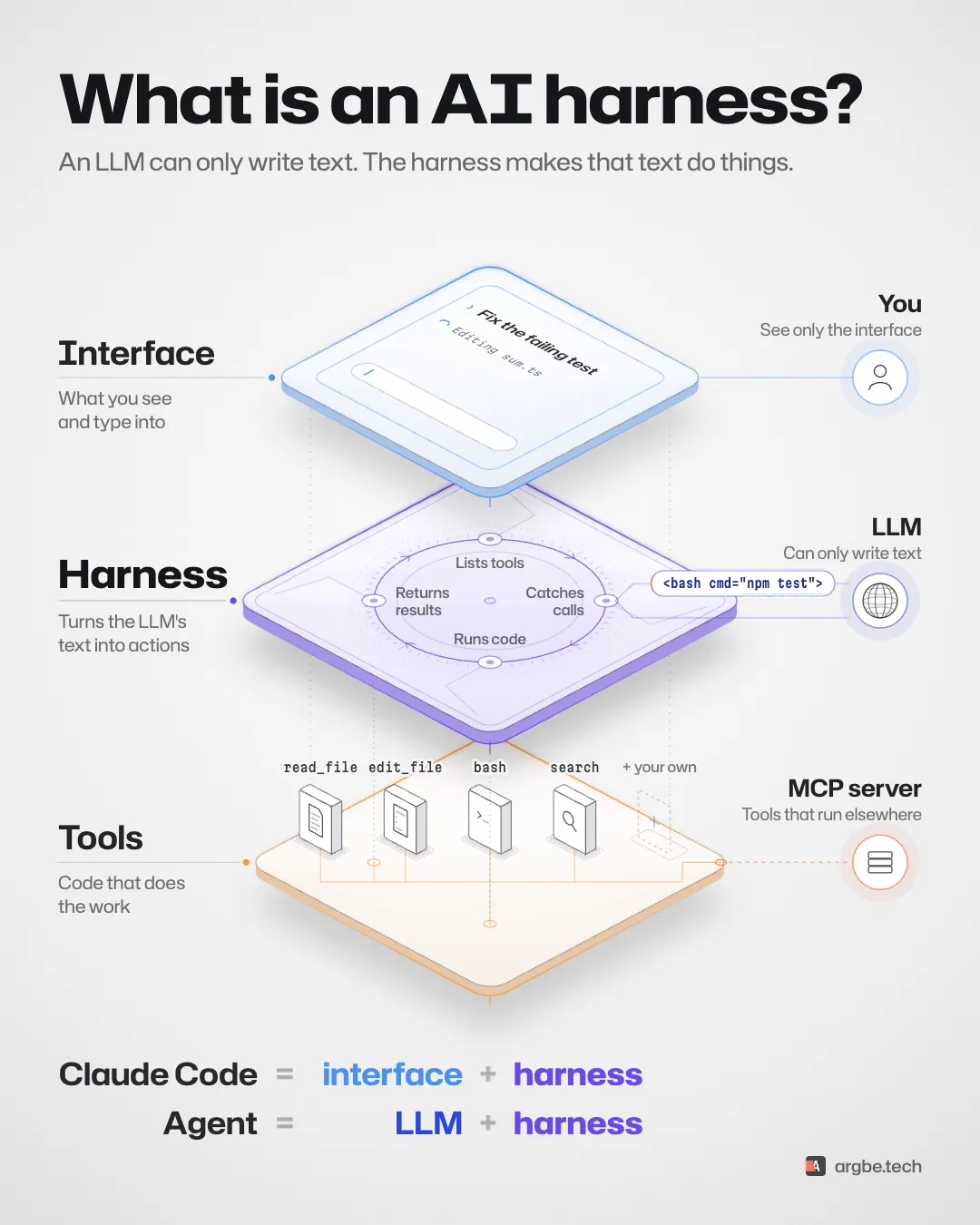
What a harness does
The animation shows four jobs, in a loop.
- Lists the tools. It tells the model which tools it may use. Each tool has a name, a description and an input schema (Anthropic).
- Catches the calls. It reads the tool calls in the model’s response and dispatches them. Over the API, calls arrive as structured blocks. Nobody has to search the answer text for them (Anthropic).
- Runs them. It checks that each call is allowed. Then it hands the call to the code that executes it. It can also say no (Agent SDK).
- Returns the results. It feeds each result back to the model and loops. The run ends with a final answer. Or something else stops it: a limit, an error, a refusal or a cancel (Anthropic).
That’s the core loop. A production harness does more:
- Context. It decides what the model sees on each turn. The Claude Agent SDK compacts old history automatically near the context limit (Agent SDK).
- Permissions and approvals. It decides which calls run alone and which wait for a person.
- Sandboxing. It limits what a command can reach. Codex documents how it enforces sandbox and approval rules (OpenAI).
A homemade loop gets none of these for free.
Approvals aren’t a detail. My coding agent once opened a public tunnel without asking. An agent in a business workflow is no different. Its harness decides what it may do alone.
Who runs the tool
Not every tool runs inside your harness. Anthropic separates client tools from server tools (Anthropic).
- Client tools run in your application’s environment. Your harness executes them. In the animation, reading a file, editing it and running
npm testare client tools. - Server tools run on the provider’s infrastructure. OpenAI’s Code Interpreter is one example: OpenAI runs the code for you.
- MCP tools run in an MCP server. The harness reaches them through an MCP client. More on that below.
Where Claude Code, Codex and MCP fit
Claude Code. Its terminal app is the interface. The agent runtime under it is the harness. Anthropic ships the same tools and agent loop as the Claude Agent SDK, for Python and TypeScript (Agent SDK overview). Anthropic calls it a harness too (Anthropic). The TypeScript package is @anthropic-ai/claude-agent-sdk (quickstart). The loop below uses the separate Messages API client.
Codex. OpenAI calls the shared loop behind the Codex CLI, IDE extension and apps “the Codex harness” (OpenAI, February 4, 2026). Clients reach it through the App Server. That’s a long-running process with a two-way JSON-RPC protocol (App Server docs).
MCP servers. An MCP server offers tools, resources and prompts (MCP). It can run on your machine or on another one. A local server usually runs as a subprocess over stdio. A separately running server can use Streamable HTTP, remote or on localhost. The host application runs one MCP client per server (MCP architecture). That client calls the server’s tools and hands the results back to the loop.
To the model, an MCP tool can look like any other tool. The harness still handles the protocol, the login and the rules. In the animation, that’s the GitHub call that leaves the plate. MCP is optional, though. The loop below uses none.
LLM + harness = agent
That’s my shorthand. It’s a teaching model, not a formal definition. Here, an agent is a model running in a harness. The harness manages context and tools. The model picks each next step. Anthropic draws a similar line between agents and fixed workflows (Anthropic).
My take: two “different” agents are often one model with different tools, instructions and MCP servers. OpenAI’s Agents SDK builds an agent from those parts: instructions, a model and tools (OpenAI Agents SDK).
What a real tool call looks like
The tape in the animation says <bash cmd="npm test">. That’s shorthand. It isn’t Anthropic’s or OpenAI’s format. The model generates the request, and the API hands it to you as structured data (Anthropic).
Say your harness defines a tool called bash with a command input. On Anthropic’s Messages API, the response then carries a tool_use block:
{
	"role": "assistant",
	"content": [
		{
			"type": "tool_use",
			"id": "toolu_01",
			"name": "bash",
			"input": { "command": "npm test" }
		}
	],
	"stop_reason": "tool_use"
}
The ID is a placeholder. Thinking blocks and other fields are left out here. Your harness still sends them back.
The harness runs the command. It appends the assistant’s whole content to the conversation. Then it adds a user message with a tool_result, matched by ID:
{
	"role": "user",
	"content": [
		{
			"type": "tool_result",
			"tool_use_id": "toolu_01",
			"content": "<what npm test printed>"
		}
	]
}
Every call gets a result with its ID. Results come before any other text in that message (Anthropic). Then the harness sends the conversation again. When the model is done, stop_reason is end_turn (Messages API).
OpenAI’s Responses API works the same way, with other names. A function_call item carries a call_id. Your harness answers with a function_call_output (OpenAI).
A short agent loop in TypeScript
Here’s the whole loop with Anthropic’s client, @anthropic-ai/sdk. It has one harmless tool: a clock. It needs ANTHROPIC_API_KEY in the environment and runs as an ES module.
import Anthropic from '@anthropic-ai/sdk'

const client = new Anthropic() // reads ANTHROPIC_API_KEY

// Lists tools: what the model may ask for. One harmless tool here.
const tools: Anthropic.Tool[] = [
	{
		name: 'get_time',
		description: 'Get the current UTC date and time.',
		input_schema: { type: 'object', properties: {}, additionalProperties: false }
	}
]

// Runs code: only the names you handle can run.
function runTool(call: Anthropic.ToolUseBlock): Anthropic.ToolResultBlockParam {
	const input = call.input
	if (
		call.name !== 'get_time' ||
		input === null ||
		typeof input !== 'object' ||
		Array.isArray(input) ||
		Object.keys(input).length !== 0
	) {
		return {
			type: 'tool_result',
			tool_use_id: call.id,
			content: 'Unknown tool or invalid arguments',
			is_error: true
		}
	}
	return { type: 'tool_result', tool_use_id: call.id, content: new Date().toISOString() }
}

async function runAgent(prompt: string): Promise<string> {
	const messages: Anthropic.MessageParam[] = [{ role: 'user', content: prompt }]

	for (let turn = 0; turn < 10; turn++) {
		const response = await client.messages.create({
			model: 'claude-opus-5-5',
			max_tokens: 16000,
			tools,
			messages
		})
		// Keep every block, thinking included, exactly as it came back.
		messages.push({ role: 'assistant', content: response.content })

		if (response.stop_reason === 'end_turn') {
			return response.content
				.flatMap((block) => (block.type === 'text' ? [block.text] : []))
				.join('')
		}
		if (response.stop_reason !== 'tool_use') {
			throw new Error(`Stopped: ${response.stop_reason}`)
		}
		// Catches calls: the tool_use blocks in the response.
		const calls = response.content.filter(
			(block): block is Anthropic.ToolUseBlock => block.type === 'tool_use'
		)
		// Returns results: one for each call, all in one user message.
		messages.push({ role: 'user', content: calls.map(runTool) })
	}
	throw new Error('Too many turns')
}

console.log(await runAgent('What time is it in UTC?'))
A few things matter here:
- The whole
contentgoes back. Claude Opus 5.5 always thinks (Anthropic). Its thinking blocks must go back unchanged. So the loop never rebuilds history from text (Anthropic). - It stops on anything unexpected. That covers
max_tokens,refusal, andpause_turnif you add server tools. Text alone doesn’t mean the job is done. Thestop_reasonsays so (Anthropic). - There’s no
temperature. API version 2026-10-21 rejects it, along withtop_pandtop_k(Anthropic). The client sends that version by default (TypeScript SDK). - The turn cap bounds requests. It doesn’t bound time or cost.
The loop follows Anthropic’s documented request and response shapes. It type-checks in strict mode against @anthropic-ai/sdk 1.1.0. It also runs against a local mock of the API. It hasn’t run against the live API.
It has no shell, no file access, no MCP, no compaction, no approvals and no sandbox. Adding a shell means adding those limits too. That’s what the rest of a production harness is for. For real coding work, the Claude Agent SDK has permissions and compaction built in (Agent SDK).
On this page