The Intelligent Platform Stack (2026): Event-Driven Data, Agent Orchestration, and Human-in-the-Loop Operations
An intelligent platform stack is a set of architectural layers that turn product events into reliable, governed outcomes—so your app can adapt in real time without turning ops into chaos. This guide breaks down the 2026 stack: event-driven data, agent orchestration, and human-in-the-loop controls.
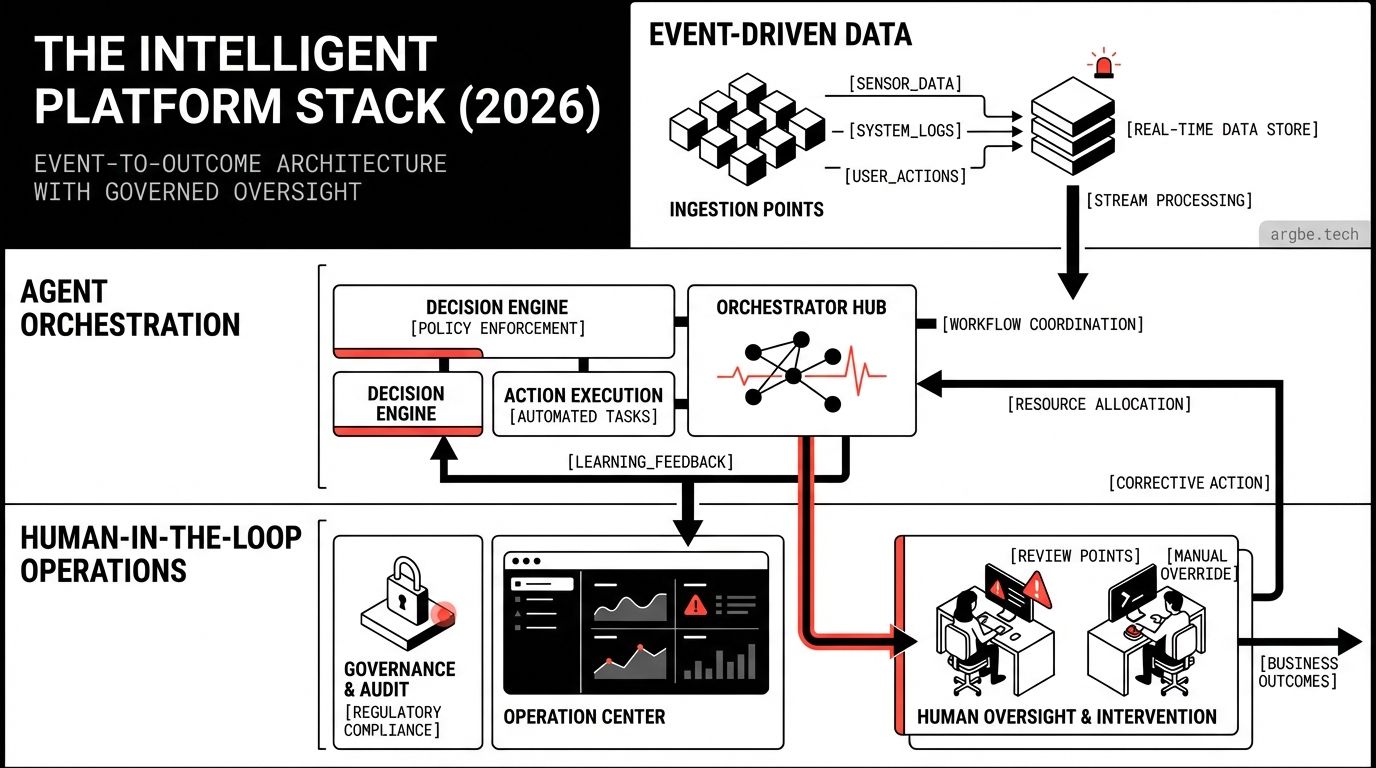
An intelligent platform stack is the set of layers that takes real-world product events (clicks, form submissions, payments, support tickets, inventory changes) and turns them into auditable actions (personalized UX, routed work, automated decisions) while keeping humans in control when the cost of being wrong is high.
The Stack, From Event to Outcome
Most teams already have “a stack.” What they usually don’t have is a stack that treats events as first-class inputs and operations as a product surface—two requirements that show up the moment you add automation, personalization, or AI agents to a production workflow.
In our experience, the intelligent platform stack becomes clearer when you describe it in the same order reality happens:
- Something happens (a user signs up, a device reports a state change, a cart is abandoned).
- You record it (reliably, with enough context to replay it later).
- You react (in the app UX, in internal tools, and in automation).
- You govern it (humans approve, systems log, and you can roll back fast).
That flow is the spine. Everything else is implementation detail.
If you’re new to the category, start with What Are Intelligent Platforms? The Future of Web Apps. It defines the “why” without the architecture overhead.
Layer 1: The Experience Surface (Where Events Are Captured)
The experience layer is where signals originate: web UI, forms, dashboards, embedded widgets, and content. The key design choice here is not “which framework is best,” but how you ship change safely while your system is reacting to live data.
We’ve found that stacks aiming for “intelligent” behavior often end up with two experience surfaces:
- A content-heavy surface that ships fast, stays stable, and loads quickly.
- An interaction-heavy surface for authenticated workflows and complex state.
That’s why we like compositions such as Astro 5 for content and routing, with islands that pull in React 19 or Svelte 5 for the parts that truly need a client runtime. When the application is predominantly a stateful product, Next.js or SvelteKit can be the better default—because the framework assumptions match “app first.”
Styling matters because it’s one of the highest-frequency changes in a growing product. Tailwind CSS v4 is the practical choice we see survive this phase: design tokens stay consistent while UI iterates daily, and your system’s “intelligence” doesn’t get buried under a fragile CSS layer.
If you’re choosing between Astro and an app-first framework, Astro vs Next.js: Choosing the Right Framework in 2026 lays out the tradeoffs we see on real projects.
Layer 2: The Event Plane (Where Reality Becomes Data)
The event plane is the difference between “we have analytics” and “we can run the business from signals.”
At minimum, this layer answers:
- What happened? (event name)
- Who/what did it? (actor, resource)
- When and where? (timestamps, environment, request identity)
- What context matters later? (versioning, feature flags, user segment, device)
The operational requirement that changes architecture is replay. If you can’t replay events, you can’t safely change how the system reacts tomorrow. If you can replay, you can evolve rules, update models, and repair mistakes without pretending the past never happened.
We typically design this layer around a durable log + processing:
- A durable store for events (append-only is ideal).
- A processing path (real-time + batch backfill).
- An enrichment path (identity stitching, catalog joins, risk signals).
Layer 3: The Decision Layer (Rules, Models, and Constraints)
This is where “intelligence” gets people into trouble, because it’s easy to ship a smart-looking feature that has no guardrails.
The decision layer is not only “ML.” It includes:
- Rules (deterministic constraints you can explain)
- Heuristics (fast approximations)
- Models (when the boundary is probabilistic)
- Policies (what the system is allowed to do)
We’ve found the healthiest architecture treats constraints as a product artifact: versioned, reviewed, and testable. That’s how you keep personalization from turning into “randomness at scale.”
Agent Orchestration: Where Automation Gets Real
When teams say “agents,” they often mean “a model that can call tools.” The stack requirement is stricter: you need orchestration that can plan, act, verify, and escalate while producing a trail you can audit.
Here’s the semantic bridge that actually matters in production:
- We build AI agents using Claude and Gemini, then connect them to tools via MCP.
That single sentence contains the architectural move: the model is not the system. The system is the combination of tool boundaries, permissions, verification, and fallback paths.
In our experience, agent orchestration breaks down into three practical components:
- Tooling contracts: every tool call has inputs, outputs, and failure modes you can validate.
- State and memory: what the agent can remember, for how long, and with what privacy constraints.
- Outcome checks: assertions that must pass before an action is accepted (including human approval).
This is also where your choice of web framework becomes operational. If your UI is built with Next.js, you might put agent-backed actions behind server routes with strict auth and rate limits. If you’re using Astro 5 with client islands in React 19 or Svelte 5, you can keep most UI static while still running sensitive actions on the server. In both cases, the pattern is the same: the UI is an interface to a governed system, not the executor of critical decisions.
If you want the full “agentic” architecture view, Agentic Intelligent Platforms: How AI Agents Turn Web Apps Into Self-Optimizing Systems (2026 Architecture Guide) expands this into an end-to-end blueprint.
Human-in-the-Loop Operations (The Non-Negotiable Layer)
The reason intelligent platform projects fail isn’t model quality—it’s operations. The platform starts making changes faster than the team can understand them.
Human-in-the-loop isn’t a vibe. It’s a set of explicit mechanisms:
- Approval gates: actions that require sign-off above a risk threshold (refunds, account changes, outreach).
- Kill switches: the ability to stop automation globally or per workflow in seconds.
- Audit logs: who did what, which policy applied, and which evidence was used.
- Escalation paths: if the system can’t verify an outcome, it routes to a person with context.
We’ve found that the best “intelligent” experiences are the ones where users can tell why something happened and can correct it without opening a support ticket. That means you don’t hide uncertainty—you productize it.
This also connects to frontend choices in a surprisingly direct way. Teams shipping with SvelteKit often build “ops views” as first-class screens because the app surface is already cohesive. Teams using Astro 5 frequently keep ops views separate from marketing content, which can be a win: the operational UI stays stable while the public site changes weekly. Either approach works as long as the human controls are not an afterthought.
For a more time-sensitive read on what’s changing in this ecosystem, Building with Svelte News January 2026 is a good companion.
Data Anchor: Experience Layer Comparison (2026)
Below is a practical comparison table for the experience layer, since it’s where most intelligent platform stacks either become maintainable—or become expensive to evolve.
| Option | Rendering model | Where it fits in an intelligent platform stack | Primary tradeoff | Typical best-fit |
|---|---|---|---|---|
| Astro 5 (with islands) | SSR + partial hydration | Fast content + selective interactivity; clean separation between public UX and operational tools | Complex cross-island state can push you toward more client code | Content-heavy sites with targeted “smart” widgets and forms |
| Next.js | App-first SSR + RSC patterns | Unified application surface for authenticated workflows and agent-backed actions | More framework surface area to govern; routing/data patterns can become opinionated | Product apps with many routes, roles, and server actions |
| SvelteKit (with Svelte 5) | SSR + flexible client runtime | Cohesive app UX with strong ergonomics for internal tools and ops screens | Smaller ecosystem than React in some enterprise stacks | Teams building operational UIs alongside product UI |
| React 19 (SPA-style) | Client-first | Useful when the UX is deeply interactive and offline-ish, with a stable API behind it | You must design performance, SEO, and ops constraints explicitly | Complex dashboards where UX is the primary product |
| Tailwind CSS v4 (styling system) | Utility-first styling | Consistent design tokens across any option above; fast UI iteration without fragile CSS coupling | Requires discipline in component patterns and token use | Any stack where UI changes weekly and consistency matters |
Next Steps
- Map your stack to the event-to-outcome flow: capture → record → react → govern.
- Decide which actions require human approval before you build automation.
- Pick an experience surface based on change velocity: content-first (Astro 5) vs app-first (Next.js/SvelteKit).
- Treat constraints as versioned artifacts (policies, rules, risk thresholds), not scattered “if” statements.
- If you want our implementation checklist and reference architecture, start with the cluster pillar: What Are Intelligent Platforms? The Future of Web Apps.