
Zaraz consent: two questions instead of a cookie form
How Cloudflare Zaraz gates GA4, PostHog, Google Ads and Microsoft Advertising by consent purpose, why I replaced its dialog with a prompt that asks one question at a time, and how Preview & Publish and the cf CLI keep each change reviewable.
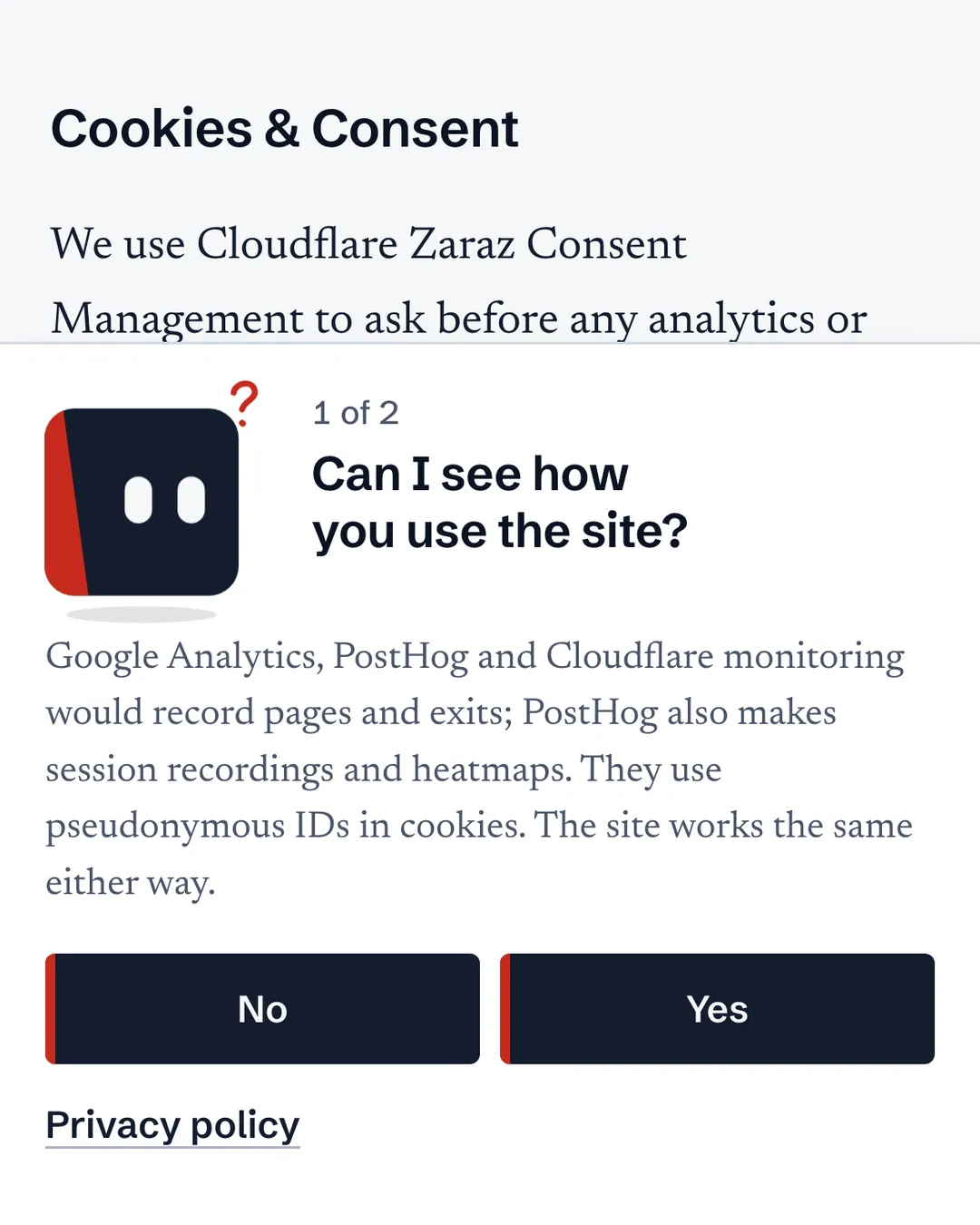
I really like the new consent prompt on this site. It asks two questions, one at a time, and a small bot reacts to each answer. I think it’s a better solution than the general static forms most sites show.
The prompt only asks. Cloudflare Zaraz holds the answers. Each tool is assigned to a consent purpose and waits until that purpose is granted: GA4 and PostHog under Analytics, Google Ads and Microsoft Advertising under Advertising measurement. The prompt records both answers through Zaraz’s Consent API, so Zaraz stays the only consent authority. The code below is a minimal, generic version of what runs here, and it says what it leaves out.
Why not a static form
Most consent forms put everything on screen at once: a block of legal text, a list of toggles and a row of buttons. The EDPB’s cookie banner taskforce described what goes wrong with them: no way to refuse on the first layer, pre-ticked boxes, refusal links that mislead, and colours and contrast that push one answer (EDPB report).
My prompt does it differently.
One question at a time, in plain words. First “Can I see how you use the site?”, then “Can ad platforms count visits that came from an ad?” Under each question, one short paragraph names the tools and what they store. The prompt asks in the page’s language, while Zaraz’s own modal follows the browser’s Accept-Language header unless you set its __zarazConsentLanguage override (Cloudflare).
No and Yes look the same. Same button, same size, side by side, No first. Each question takes one click, so refusing everything takes two, the same as accepting everything. CNIL says refusing should be as easy as accepting, and its FAQ asks for refusal in one click, in the same place as acceptance (CNIL, FAQ). A banner with a Reject all button refuses everything in one click. Asking one question at a time costs that second click.
It doesn’t take over the page. It’s a card docked at the bottom, not a modal. You can keep reading and scrolling while it asks, and on a phone the page above it stays visible.
The bot is never sad about a No. While you decide, it looks at No and Yes with the same interest. A Yes gets a smile and a No gets a calm face. At the end it waves goodbye if you allowed anything and nods if both answers were No.
It tells you what happened. When you’re done it says, for example, “Saved. Analytics is on; advertising measurement stays off,” and where to change it: Privacy preferences, at the foot of every page.
How Zaraz consent works
Zaraz is Cloudflare’s third-party tool manager, available on every plan (Cloudflare). You add tools from a catalog, such as GA4, Google Ads and Bing, and they run as Managed Components. Cloudflare does much of their work, and the browser loads a lightweight loader from your own domain, /cdn-cgi/zaraz/i.js (loading Zaraz). That doesn’t make everything server-side. A component can still ask the browser to run JavaScript, make requests or set cookies (Managed Components).
Consent is organized by purpose (consent management). You create purposes, like Analytics and Advertising measurement, and assign each tool to one. A tool waits until its purpose is granted. A tool with no purpose skips the consent check entirely, so every new tool needs a purpose before it goes live.
Choices live in a first-party cookie that maps each purpose to yes or no. By default, Zaraz shows its own modal to anyone who hasn’t chosen yet. Set consent.hideModal to true in the configuration and the modal stops opening on its own, while the Consent API keeps working (configuration, Consent API). That one setting is what lets your own prompt take over.
The Consent API is small:
zaraz.consent.APIReady // true once the API is usable
zaraz.consent.purposes // the configured purposes: id, name, description, order
zaraz.consent.get(purposeId) // true, false, or undefined for an unknown purpose
zaraz.consent.getAll() // every purpose's state
zaraz.consent.set({ [purposeId]: true }) // update only the purposes you pass
zaraz.consent.setAll(false) // update all of them
zaraz.consent.sendQueuedEvents() // send pageview events withheld for lack of consent
zaraz.consent.modal = true // open Zaraz's own modal
Two events fire on document: zarazConsentAPIReady when the API is ready, and zarazConsentChoicesUpdated when a choice changes.
sendQueuedEvents() does less than its name suggests. It sends the pageview-based events Zaraz held back while it waited for consent. It doesn’t replay every event from before the answer.
Building the prompt
You need a Cloudflare zone with Zaraz, consent management turned on, a purpose for every tool, and consent.hideModal set. This site is Astro 7 on Cloudflare Workers, through Astro’s Cloudflare adapter (Astro 7, adapter). The prompt is one component in the site layout. Its markup:
<!-- In the layout, so it's on every page -->
<section id="consent" aria-label="Privacy choices" hidden transition:persist>
	<div aria-live="polite">
		<p id="consent-text" tabindex="-1"></p>
		<p id="consent-detail"></p>
	</div>
	<p id="consent-error" role="alert"></p>
	<div id="consent-answers">
		<!-- One element and one class for both answers: No is never the smaller option -->
		<button type="button" class="consent-answer" data-answer="no">No</button>
		<button type="button" class="consent-answer" data-answer="yes">Yes</button>
	</div>
</section>

<!-- In the footer -->
<button type="button" data-privacy-preferences>Privacy preferences</button>
The script is one module, shown here in four parts. First, the purpose IDs and two helpers:
const ANALYTICS = 'your-analytics-purpose-id'
const ADS = 'your-ads-purpose-id'
const COOKIE = 'cf_consent' // the consent cookie name in your Zaraz settings
const $ = (id) => document.getElementById(id)

function whenConsentReady(fn) {
	if (window.zaraz?.consent?.APIReady) fn()
	else document.addEventListener('zarazConsentAPIReady', fn, { once: true })
}

// Ask only when no choice is stored yet
function hasChoice() {
	return document.cookie.split(';').some((part) => part.trim().startsWith(`${COOKIE}=`))
}
Google Consent Mode
Zaraz passes Google Consent Mode v2 states to GA4 and Google Ads (Google Consent Mode). Set the defaults to denied in the dashboard, under Set Google Consent Mode v2 state, so they apply before any tool loads. Zaraz doesn’t map your purposes to Google’s categories. That mapping is yours, and you send it with zaraz.set. This function sends the stored choice. It runs when the API is ready, so a returning visitor’s choice reaches Google too, whenever the choice changes, and right after a save:
let lastGoogleState = ''

function syncGoogleConsent() {
	const all = zaraz.consent.getAll()
	const analytics = all[ANALYTICS] === true
	const ads = all[ADS] === true
	const state = {
		analytics_storage: analytics ? 'granted' : 'denied',
		ad_storage: ads ? 'granted' : 'denied',
		ad_user_data: ads ? 'granted' : 'denied',
		ad_personalization: 'denied' // this example's policy: no question covers personalized ads
	}
	const key = JSON.stringify(state)
	if (key === lastGoogleState) return // send only real changes
	lastGoogleState = key
	zaraz.set('google_consent_update', state)
}
The Google state is a signal to Google’s tags. What keeps GA4 or Google Ads from running without consent is the purpose gate in Zaraz. They’re separate layers, and you need both.
Asking and saving
The answers stay in memory until the second question, then go to Zaraz in one call:
const QUESTIONS = [
	{
		purpose: ANALYTICS,
		text: 'Can I see how you use the site?',
		detail: 'Name the analytics tools and what they store.'
	},
	{
		purpose: ADS,
		text: 'Can ad platforms count visits that came from an ad?',
		detail: 'Name the ad platforms and what they store.'
	}
]
let step = 0
let answers = {}
let opener = null
let closeTimer = 0

function ask(index) {
	step = index
	$('consent-text').textContent = QUESTIONS[index].text
	$('consent-detail').textContent = QUESTIONS[index].detail
}

function openPrompt(byUser) {
	clearTimeout(closeTimer)
	answers = {}
	opener = byUser ? document.activeElement : null
	$('consent-error').textContent = ''
	$('consent-answers').hidden = false
	$('consent').hidden = false
	ask(0)
	if (byUser) $('consent-text').focus()
}

function save() {
	try {
		zaraz.consent.set(answers) // both answers in one call
	} catch {
		return false
	}
	syncGoogleConsent() // Google's state first, then the held-back pageviews
	if (Object.values(answers).includes(true)) zaraz.consent.sendQueuedEvents()
	return true
}

function answer(yes) {
	answers[QUESTIONS[step].purpose] = yes
	if (step < QUESTIONS.length - 1) return ask(step + 1)
	if (!save()) {
		// Nothing was recorded: say so, and let the last answer be given again
		$('consent-error').textContent = "Your choice wasn't saved. Please answer again."
		return
	}
	const hadFocus = $('consent').contains(document.activeElement)
	$('consent-text').textContent = 'Saved. Change it any time under Privacy preferences.'
	$('consent-detail').textContent = ''
	$('consent-error').textContent = ''
	$('consent-answers').hidden = true
	if (hadFocus) $('consent-text').focus()
	closeTimer = setTimeout(() => {
		const focusInside = $('consent').contains(document.activeElement)
		$('consent').hidden = true
		if (focusInside) (opener ?? document.querySelector('[data-privacy-preferences]'))?.focus()
	}, 2500)
}
Wiring it into Astro
// Astro runs a component's bundled script once per full page load, so these listeners never pile up
document.addEventListener('click', (event) => {
	const target =
		event.target instanceof Element &&
		event.target.closest('[data-answer], [data-privacy-preferences]')
	if (!target || !window.zaraz?.consent?.APIReady) return
	if (target.hasAttribute('data-privacy-preferences')) openPrompt(true)
	else answer(target.dataset.answer === 'yes')
})
// A change made anywhere, Zaraz's own modal included
document.addEventListener('zarazConsentChoicesUpdated', syncGoogleConsent)

// After the first load and after every client-side navigation
document.addEventListener('astro:page-load', () =>
	whenConsentReady(() => {
		syncGoogleConsent()
		if (!hasChoice() && $('consent').hidden) openPrompt(false)
	})
)
With Astro’s <ClientRouter />, the page doesn’t reload between routes. astro:page-load fires after the first load and after each client-side navigation, so the decision to ask runs on every page, and transition:persist keeps an open question on screen across a navigation (view transitions). Handle route changes explicitly instead of assuming a fresh document on every navigation.
The example leaves out the bot and its animation, a summary that names what was turned on, and stepping aside while Zaraz’s own modal is open, which only matters if that modal can still open. If Zaraz doesn’t load at all, the prompt never appears and nothing optional runs.
How each tool gets its events
Consent and delivery are separate steps. A purpose decides whether a tool may run. A trigger and an action decide what it receives (triggers, actions).
| Tool | Purpose | Set up in Zaraz | What it receives |
|---|---|---|---|
| GA4 | Analytics | Catalog tool, with your measurement ID (G-XXXXXXXXXX) | Page views and events, through actions |
| PostHog | Analytics | Custom HTML tool with the loader below | The SDK’s own capture calls |
| Google Ads | Advertising measurement | Catalog tool, with your Google Ads conversion ID | A pageview action |
| Microsoft Advertising | Advertising measurement | Catalog tool listed as Bing, with your UET tag ID | A pageview action |
Page views come from Zaraz’s built-in Pageview event, so each catalog tool gets a pageview action on the Pageview trigger. Keep three names apart. Pageview is Zaraz’s own event. zaraz.track('page_view') would be a custom event you named yourself. pageview is an action type a tool listens for: GA4 turns it into page_view, and Bing turns it into pageLoad and an event action into custom (trigger rules, Bing component).
A custom event takes three pieces. The site sends it with zaraz.track(name, props), where props is a flat object (Track API). PostHog’s SDK doesn’t see that call, so the same helper also calls posthog.capture() when Analytics is granted:
function track(name, props) {
	zaraz.track(name, props)
	if (zaraz.consent.get(ANALYTICS) === true) window.posthog?.capture(name, props)
}

track('signup_click', { location: 'header' })
A trigger matches the event by name, and an action on the tool says what to send (create a trigger):
Trigger          Signup click
  Rule           {{ client.__zarazTrack }}  equals  signup_click

GA4 action
  Action type    Event
  Firing trigger Signup click
  Event name     signup_click
  Field          location = {{ client.location }}
{{ client.__zarazTrack }} is the name passed to zaraz.track(), and {{ client.location }} reads its location property (context). Match the event name exactly: a trigger that only checks the hostname or path matches every event on that page. Zaraz still checks each action’s tool against its purpose before it runs.
GA4. Pass flat fields, as above. The component adds GA4’s ep. and epn. prefixes itself, so pre-prefixing risks doubles (GA4 component). Two GA4 settings are worth checking: whether it forwards the visitor’s IP, and Google audiences. The audience option can make the browser call Google’s advertising endpoints, so it’s more than a reporting flag (GA4 listeners).
Google Ads and Microsoft Advertising. With advertising consent, both get a page signal, so a lead that arrives later can be tied to the ad click that brought it, through gclid or msclkid. That’s the part of a sales funnel that tells you which ad a lead came from. The Google Ads component can run its conversion linker on a pageview without sending a conversion (Google Ads component). The Bing component builds Microsoft Advertising UET requests and sends them from the browser. Here, that page signal is all they get from browsing. No clicks, scrolls or form steps go to an ad platform.
PostHog. PostHog isn’t in Zaraz’s tool catalog (supported tools). I run it as a Custom HTML tool, assigned to Analytics, so consent stays in one place. Custom HTML runs its JavaScript in the visitor’s browser (Custom HTML component), so after a yes this is the regular PostHog JS SDK. It sends to PostHog’s EU Cloud (data storage) through a first-party reverse proxy (proxy). Give the tool an action on the Pageview trigger, with a loader like this:
<script>
	;(() => {
		// Zaraz can inject Custom HTML again on client-side pageviews: set up once, then only re-sync
		if (window.__posthogConsent) return window.__posthogConsent()

		const ANALYTICS = 'your-analytics-purpose-id'
		const allowed = () => window.zaraz?.consent?.get(ANALYTICS) === true

		// Paste only the first statement of PostHog's web snippet here, the minified
		// !function(...) bootstrap. Leave out its <script> tags and its posthog.init() call.

		let ready = false
		function sync() {
			if (!ready) return // loaded() runs the first sync
			if (allowed()) {
				if (!posthog.has_opted_in_capturing()) posthog.opt_in_capturing()
			} else {
				posthog.stopSessionRecording()
				posthog.opt_out_capturing()
			}
		}
		window.__posthogConsent = sync

		posthog.init('<project token>', {
			api_host: 'https://ph.example.com', // your first-party reverse proxy
			ui_host: 'https://eu.posthog.com',
			opt_out_capturing_by_default: true, // nothing is captured until sync() opts in
			before_send: (event) => (allowed() ? event : null), // check consent per event; null drops it
			loaded: () => {
				ready = true
				sync() // the choice can change while the SDK downloads
			}
		})

		document.addEventListener('zarazConsentChoicesUpdated', sync)
	})()
</script>
There’s one posthog.init(), and the SDK starts opted out. loaded runs the first sync, and every later change runs it again (configuration). before_send can edit or drop an event before it leaves the browser (JavaScript usage). A withdrawal opts out and stops session recording, if you turned it on. This setup doesn’t use PostHog’s cookieless_mode, so a No means no PostHog capture rather than cookieless measurement. Choose persistence deliberately: memory isn’t the cookieless mode. Zaraz’s Ignore SPA option is the other way to stop repeat injection (FAQ).
How Cloudflare streamlines the setup
Everything above lives in one Zaraz dashboard: tools, triggers and actions, purposes, consent, and privacy settings such as Clean User Agent strings (settings). Three parts make changes reviewable.
Preview & Publish. By default, Zaraz applies changes in real time. With the Preview & Publish workflow on, changes stage in a preview. Run zaraz.preview('<debug key>') in the browser console and the page reloads with the debugger and the preview configuration. Publish makes it live for everyone (Preview & Publish). Keep the real debug key out of screenshots.
History. Each version is listed with its date, user and description. Restore an earlier one, then publish it (versions).
Debugger. zaraz.debug('<debug key>') shows events, triggers and component requests (debug mode). It shows what Zaraz did, not whether Google or PostHog accepted it.
Then there’s the cf CLI. Cloudflare’s official CLI has been in open beta since 28 September 2026 (launch post, docs), and it covers the Zaraz API: configuration, workflow, publishing, export and history (Zaraz API).
# Find a command by describing the task
cf cli search "export zaraz configuration"

# "preview" stages changes; "realtime" publishes them at once
cf zaraz workflow get -z example.com

# The export contains secret values: keep it out of git, logs and chat
cf zaraz export get -z example.com > private/zaraz-export.json

# The versions you can restore
cf zaraz history list -z example.com
cf zaraz config update replaces the whole configuration (it’s a PUT, not a patch) and has a --dry-run flag. cf zaraz publish create publishes the preview, and cf zaraz history update restores a version by its ID. Check the workflow before any update: in realtime mode, an update goes live immediately. The CLI is a thin layer over the API, not a safety net.
On this site, an agent prepares the Zaraz change set, I approve the exact diff before anything is written to Cloudflare, and then it’s published.
Testing a change
Run each case in the preview, starting with no consent cookie:
| Answers | Expect |
|---|---|
| None yet | No GA4, Google Ads, Bing or PostHog requests |
| No, No | Still none |
| Yes, No | GA4 and PostHog only |
| No, Yes | Google Ads and Bing only |
| Yes, Yes | All four |
Repeat each case after a hard reload, where the stored choice should hold and the prompt shouldn’t return, and after a client-side navigation, where nothing should load twice. Then open Privacy preferences, withdraw Analytics, and check that GA4 and PostHog stop sending. Grant it again and check that both resume.
Use three views. The Zaraz debugger shows triggers, actions and the requests Zaraz components make. The browser’s Network panel shows what the page sends itself, including PostHog’s SDK, which the debugger doesn’t cover. Each vendor’s own event view shows whether the event arrived. On Google’s requests, read the consent values in the gcd parameter, not just its presence (Google Consent Mode).
When this isn’t the right fit
If your ad stack needs IAB TCF, Zaraz offers an optional TCF-compliant modal (IAB TCF). A two-question prompt like mine isn’t a TCF interface. And if you’d rather not own the consent screen’s design, Zaraz’s built-in modal is the simpler choice.
What’s still on me
The loader runs before anyone answers. The Zaraz loader and its Consent API load first. Otherwise nothing could record the first answer (consent management). What waits for consent is the optional tools. So “no JavaScript before consent” isn’t true for this design.
The prompt’s fairness is mine. With Zaraz’s dialog, Cloudflare designed the screen. With my own prompt, nothing stops me from making No harder or the bot sulk. Keeping it honest is on me. The EDPB calls wording or visuals that make one choice feel rewarding and the other guilty “emotional steering” (EDPB guidelines). Those guidelines were written for social media interfaces. On this prompt, a Yes gets a smile and a No gets a calm face.
A yes lets real code run. After a yes, PostHog runs its SDK in the browser, and the Ads and Bing components send requests from it. Consent decides whether they run, not what they can see once they do. Masking session recordings is my job too: PostHog’s input masking alone doesn’t cover everything on a page (replay privacy).
Withdrawing stops what comes next. Turning analytics off stops future capture. It can’t recall what was already sent (PostHog JS).
Watch the event count. Zaraz includes 1,000,000 events per account each month. Without paid usage, going past that turns Zaraz off until the next billing cycle, and every tool behind it goes quiet (pricing). Zaraz Monitoring shows the count (monitoring).
This isn’t legal advice. Two questions and equal buttons don’t make a consent screen lawful by themselves.
The prompt is live on every page here. To see it again, open Privacy preferences at the foot of the page.
On this page